

Updated: October 16, 2026
If you still run Microsoft RMS, Microsoft’s extended support for it ended in July 2021, and you have been running without it since. If you searched “Microsoft POS” to see what Microsoft sells today, the answer is a different product with a very different price tag.
This guide covers what Microsoft ended and when, what it sells now, and how an independent retailer should decide what comes next.
Key Takeaways
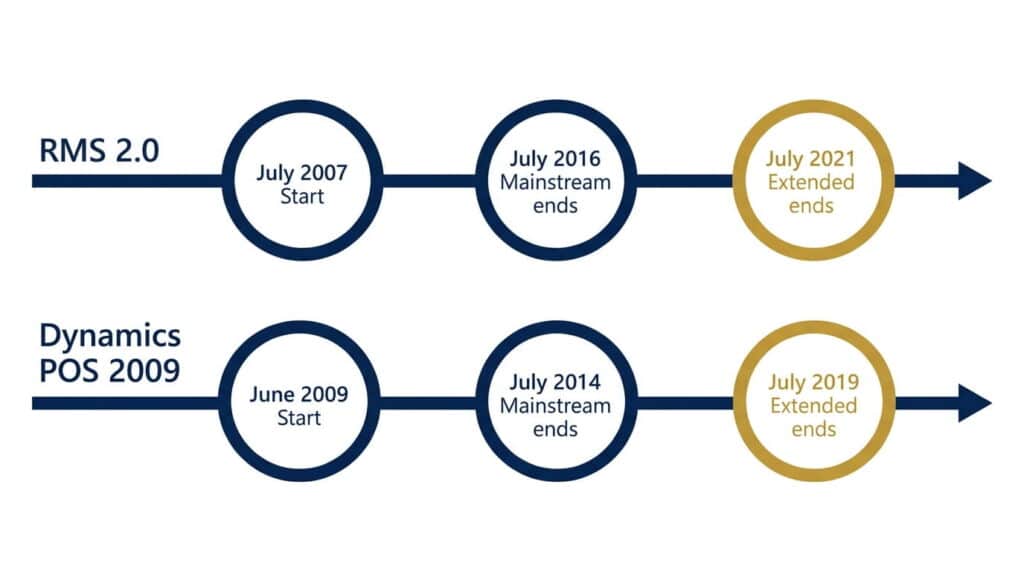
- Microsoft’s extended support ended in July 2021 for Retail Management System (RMS) 2.0 and in July 2019 for Dynamics POS 2009.
- Microsoft’s current POS is part of Dynamics 365 Commerce, listed at $210 per user per month plus add-ons.
- Dynamics 365 Business Central customers typically add a third-party POS app, such as POS365 from POS-ONE.
- Microsoft retired two Commerce add-ons from sale in February 2026 with no replacement announced yet, a sign the platform keeps narrowing, not just aging.
- Independent retailers have a third option: a cloud POS built for stores like theirs.
Table of Contents
- What is Microsoft POS Software?
- What Microsoft Ended, and When
- Microsoft’s Point of Sale Software Today
- Why Businesses Are Moving Away from Microsoft POS Software
- Your Options: Stay, Move to Microsoft, or Move to a POS Built for Independents
- The Modern Alternative to Microsoft Retail Software
- Migrating Off RMS: A Checklist
- Future-Proof Your Retail Operations
- Frequently Asked Questions
What is Microsoft POS Software?
Microsoft POS software is not one product. The phrase points to three, and they differ in support status, price, and who they are built for:
- Legacy Microsoft products: Retail Management System (RMS) 2.0 and Dynamics POS 2009, both past end of support.
- Dynamics 365 Commerce: Microsoft’s current retail platform, with its own point of sale apps.
- Third-party POS apps for Dynamics 365 Business Central: sold through Microsoft’s AppSource marketplace, but made by other companies.
What Microsoft Ended, and When
Microsoft publishes exact support dates for its products. Under its Fixed Lifecycle Policy, mainstream support includes new fixes and security updates. Extended support keeps security updates and paid support, but drops design changes and non-security updates.
| Product | Started | Mainstream support ended | Extended support ended |
|---|---|---|---|
| Dynamics Retail Management System 2.0 | July 2007 | July 2016 | July 2021 |
| Dynamics POS 2009 | June 2009 | July 2014 | July 2019 |
Those dates come from Microsoft’s own lifecycle pages.
Microsoft Retail Management System (RMS)
RMS 2.0 is the version Microsoft’s lifecycle pages track, and its extended support ended in July 2021. Nothing switches the software off on that date. What stops is Microsoft’s support, and with it the regular flow of security updates. Dynamics POS 2009 followed the same path and lost extended support in July 2019.
Microsoft’s Point of Sale Software Today
The price is where independent retailers should slow down. Microsoft’s published list price is $210 per user per month, billed yearly, with an e-commerce add-on at $4,000 per tenant per month and a separate headless commerce add-on at $4,200 per tenant per month for custom storefronts. Microsoft notes that actual prices vary by currency, country, and region, and doesn’t publish device or POS-terminal pricing at all, you have to contact Microsoft directly for that. Do the arithmetic for your own store: at list price, five users come to $1,050 a month before any add-on.
Why Businesses Are Moving Away from Microsoft POS Software
Two things push retailers off the old Microsoft systems.
The first is support. Once extended support ends, Microsoft’s Fixed Lifecycle Policy limits security updates to a separate Extended Security Update program, and warns that Microsoft “may be unable to provide security updates for older products.” A system that holds your customer and sales data should not run on that footing by choice.
The second is the cost of staying inside Microsoft’s ecosystem. The current path is Dynamics 365 Commerce, and per-user pricing multiplies fast in a store with several registers and staff.
There’s also a newer signal worth watching. As of February 2026, Microsoft pulled two Dynamics 365 Commerce add-ons, Commerce Recommendations and Ratings & Reviews, from sale entirely, with no replacement announced, according to Directions on Microsoft. The platform’s direction from here looks like paid, usage-billed AI features rather than included ones. That’s not a reason to panic, but it’s a reason to ask what else might get narrowed before you’ve finished migrating onto it.
If you’re weighing this move at all, it’s worth checking the signs your retail business has outgrown its current POS before deciding where to move to next.
Your Options: Stay, Move to Microsoft, or Move to a POS Built for Independents
| Stay on RMS | Move to Dynamics 365 Commerce | Move to RealtimePOS | |
|---|---|---|---|
| Vendor support | Ended July 2021 | Current Microsoft product | Current, actively sold product |
| Cost basis | Nothing new to buy, no vendor support | $210 per user per month list, plus add-ons | See RealtimePOS pricing |
| Built for | Legacy on-premise retail | Omnichannel retail operations, in Microsoft’s words | Independent and multi-store retailers |
Staying put is the only option whose support has already run out. If you are not ready to move, at least make the decision on your schedule, not after something breaks.
You’ll also see RMS-specific migration tools like Retail Management Hero or LS One come up in your own research, worth a look if you want to stay close to RMS’s original workflow rather than move to a cloud-first system.
Our recommendation: if you run one store or a handful, price a cloud POS built for independents before you price Dynamics 365 Commerce. If you already run Dynamics across the rest of your business, get a Commerce quote so the comparison is fair.
The Modern Alternative to Microsoft Retail Software
RealtimePOS is a cloud-based POS and retail management system built for independent and multi-store retailers, by a team with over 50 years of combined retail systems experience. The old Microsoft systems ran on your own hardware and your own upkeep. RealtimePOS streams every change to a shared cloud database, with no polling, SQL replication or FTP transfers.
It brings together:
- Inventory management: on-hand, on-order and in-transit quantities, plus transfers, visible in real time.
- QuickBooks integration: sales transactions, PO receiving, COGS and cost of inventory flow into QuickBooks.
- Barcode printing: customizable labels by SKU or style, straight from the POS.
- Promotions management: create, schedule and run promotions across multiple locations in real time.
- Customer marketing: segment customers by purchase history, frequency or demographics, then send email or SMS promotions.
RealtimePOS is a cloud-based POS and retail management system built for independent and multi-store retailers, by a team with over 50 years of combined retail systems experience. The old Microsoft systems ran on your own hardware and your own upkeep. RealtimePOS runs on a different model entirely: each sale writes straight into one shared cloud database the moment it happens, with nothing to poll, replicate, or transfer between systems.

Migrating Off RMS: A Checklist
- Export first. Pull your items, customers, and sales history out of RMS and keep a copy before you change anything.
- List your hardware. Printers, scanners, cash drawers, and card terminals all need to work with the new system.
- Decide how much history moves. Not every old sale needs to live in the new system. Agree on what does.
- Start small. Run the new system on one register or one quiet day before you cut over, never in the week before a holiday.
- Train before cutover, not after.
Ask any vendor exactly which data they import and what it looks like afterward. If RealtimePOS is on your list, ask us how RMS data would move over.
Future-Proof Your Retail Operations
Support dates do not move, whichever route you take. A move you schedule is a project. A move forced by a failure is an outage. Pick the route, then pick the date.
Call 1-888-365-0026 to talk through your move off Microsoft RMS. For the RealtimePOS side of an RMS move, see our Microsoft RMS alternative page.
Frequently Asked Questions
Is Microsoft RMS still supported?
What is Microsoft’s POS system today?
How much does Dynamics 365 Commerce cost?
What can I use instead of Microsoft RMS?
How do I move my data from Microsoft RMS to a new POS?
What happened to Dynamics 365 Commerce Recommendations and Ratings and Reviews?
Talk Through Your Move Off Microsoft RMS
Tell us how many stores and registers you run, and get a straight answer on what a move would involve.
No pressure, no obligation, just a straight answer for your setup.






