
Updated: November 25, 2026
A contractor walks up to your register with $800 in lumber and plywood, and instead of pulling out a card, he says “put it on the account.” If your POS can’t handle that sentence cleanly, you’re either turning away real revenue or tracking it on a spreadsheet that drifts out of sync with your books within a month. Accounts receivable in a retail POS isn’t an abstract accounting term, it’s the mechanism that lets that transaction happen at the register without becoming a reconciliation headache later.
Key Takeaways
- Accounts receivable in a POS means a customer charges a purchase to an approved account instead of paying at the register, and the charge posts automatically to their ledger.
- A credit limit set at account approval, not staff judgment at checkout, is what actually prevents a customer from running up unlimited debt.
- Store credit (a return credit) and a charge account (real AR) are different things, confusing them is the most common setup mistake.
- AR aging and days sales outstanding (DSO) are accounting concepts your bookkeeping handles, not features baked into every POS, know the difference before you go looking for them.
- Retail trade credit balances are rising faster than other industries right now, which makes getting this workflow right more relevant, not less.
Table of Contents
- Why Retail Accounts Receivable Isn’t Just an Accounting Term
- How the Transaction Actually Flows From Register to Ledger
- Setting Up Credit Limits and Approved Accounts
- Store Credit vs. Charge Accounts: Why the Difference Matters
- Understanding AR Aging, DSO, and Collections
- Why Trade Credit Balances Are Rising for Retailers
- Keeping Your Ledger and QuickBooks in Sync
- Frequently Asked Questions
Why Retail Accounts Receivable Isn’t Just an Accounting Term
Accounts receivable sounds like something your bookkeeper deals with at month-end, not something that happens at the register. But in a retail POS, AR is the feature that lets a customer charge a purchase instead of paying for it on the spot, sometimes called a house account or charge account, and it’s one of the most commonly misconfigured parts of a POS setup. The confusion usually starts with one mix-up: store credit and a charge account are not the same thing. Store credit is a return credit, money the business owes the customer. A charge account is the opposite, money the customer owes the business. Set one up thinking it’s the other, and your reporting is wrong from day one.
How the Transaction Actually Flows From Register to Ledger
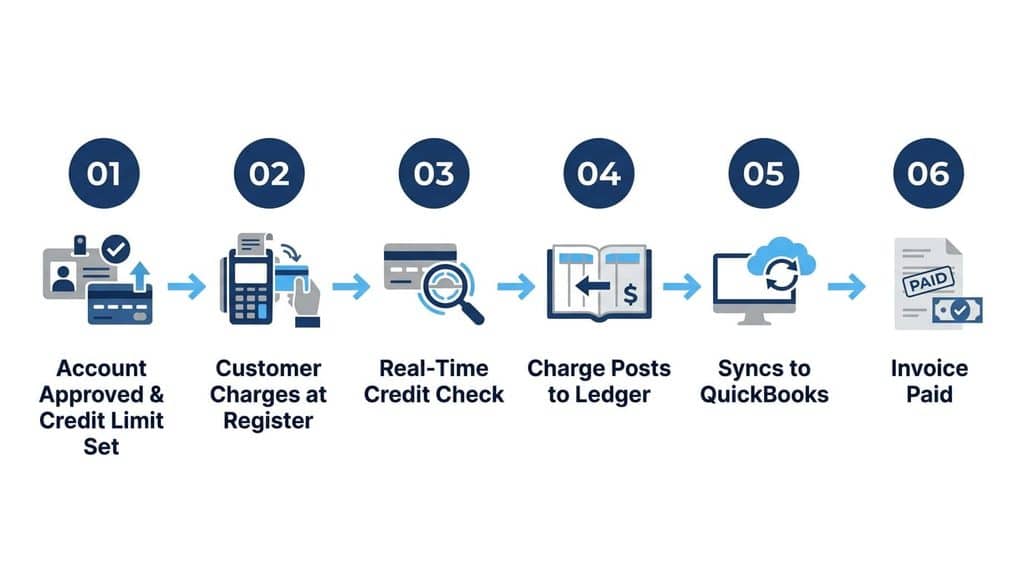
Here’s what actually happens, step by step, when a charge account is set up correctly:
- A business approves a customer for an account and sets a credit limit, done once, before any charging happens.
- The customer makes a purchase and tells the cashier to charge it to their account instead of paying.
- The POS checks that customer’s current balance against their credit limit at the register before the sale completes.
- Whether a system blocks the sale outright once a customer hits their limit, or just flags it for staff to decide, varies by POS.
- The approved charge posts automatically to that customer’s ledger.
- The ledger entry syncs to QuickBooks as a journal entry, so the business’s books reflect the charge without anyone re-entering it by hand.
That real-time credit check is the part most explanations of “accounts receivable” skip entirely, because it’s a POS mechanic, not an accounting concept. It’s also the step that actually prevents the fear most retailers have about extending credit: that one customer will quietly run up a balance nobody catches until it’s too big to collect.
Setting Up Credit Limits and Approved Accounts
RealtimePOS handles this through its AR-approved customer accounts feature: a business sets up a customer as AR-approved, sets their credit limit, and from that point forward the customer can charge purchases at the register, with every charge sent to QuickBooks in the customer’s ledger as a journal entry. Invoices get paid through the same system too, credit card, ACH, or other tenders, through RealtimePOS’s Shift4 Payments gateway, so the payment side closes the loop the same way the charge side opened it.
In our experience setting up accounts for retailers who extend credit, most billing problems trace back to one thing: an account approved verbally at the counter without a credit limit actually entered into the system first. The fix is simple, but it has to happen before the first charge, not after a balance is already a problem.
Store Credit vs. Charge Accounts: Why the Difference Matters
This distinction isn’t pedantic, it changes what your reports actually mean. A store credit balance represents a liability, money you’ll eventually give back in product or refund. A charge account balance represents an asset, money owed to you. If these get set up under the same mechanism in your POS, your “outstanding balance” report mixes money you owe customers with money customers owe you, and neither number is trustworthy anymore. Keep them structurally separate from the start.
Understanding AR Aging, DSO, and Collections
Two terms come up constantly around accounts receivable, and it’s worth knowing what they actually mean, separate from whatever your specific POS or accounting software does with them.
What an AR Aging Report Tells You
An AR aging report groups outstanding balances by how long they’ve been unpaid, typically in buckets like current, 30 days, 60 days, and 90-plus days. It’s the tool that turns “some customers owe us money” into “these three accounts are 90 days overdue and need a phone call.” Whether this report lives inside your POS or gets generated through your accounting software depends on your specific setup, check with your provider directly rather than assuming it’s automatically included.
Days Sales Outstanding (DSO) Explained
DSO measures, on average, how many days it takes to collect payment after a sale. A lower DSO means cash comes in faster. A retailer extending 30-day terms to contractor accounts should expect a DSO somewhere near that window, if it’s drifting well past 30, that’s a collections problem showing up in the numbers before it shows up as a cash-flow crunch.
Why Trade Credit Balances Are Rising for Retailers
This isn’t a niche concern. According to Experian’s own commercial credit data, average commercial balances per retail business increased 13% from 2025 to $25,900 so far in 2026, compared to just a 3% increase across other industries, reaching $23,700. Retail balances, which were roughly in line with the broader market in 2025, have now moved above it. Whatever’s driving that shift, retailers extending credit are carrying more of it, which makes the mechanics of managing it correctly matter more than they did two years ago.
Keeping Your Ledger and QuickBooks in Sync
The reason the register-to-ledger flow matters is that it eliminates the manual step most retailers are doing today: tracking charge accounts in a spreadsheet, then re-entering totals into QuickBooks separately, and hoping the two never drift apart. With QuickBooks Integration connected directly to AR-approved accounts, that journal entry happens automatically at the moment of the charge, not during a monthly reconciliation scramble.
For a deeper look at how this plays out in a specific vertical, our guide on hardware store POS software covers the same mechanic in a contractor-account context.
Conclusion
Accounts receivable in a retail POS isn’t complicated once you see the actual mechanics: an approved account, a credit limit checked at the register, a charge that posts to a ledger, and a sync to your books that happens without anyone touching a spreadsheet.
The retailers who run into trouble are almost always the ones who approved an account verbally and never set the limit in the system. Get that one step right, and the rest of the workflow takes care of itself.
Frequently Asked Questions
How do I set a credit limit for a customer in my POS?
Is store credit the same as accounts receivable?
How do I run an AR aging report from my POS?
Can QuickBooks sync automatically with POS charge accounts?
See Credit Accounts Running on Your Own POS
Walk through how credit limits, charge accounts, and QuickBooks sync actually work together, with your own setup in mind.
No pressure, no obligation, just a real walkthrough.