Updated: November 23, 2026
A retailer selling $400,000 a year on Square’s standard rate pays roughly $12,000 annually in processing fees, before any software costs. That number is usually what triggers the decision to leave. Then the second decision hits: what actually happens to two years of customer data, gift card balances, and a drawer full of Square hardware when you switch. This isn’t a pitch for any particular system. It’s the checklist to run before you commit to one.
Key Takeaways
- Your customer and transaction history can transfer, but Square’s own process takes up to two weeks and only the account owner can request it.
- Gift card balances and active subscriptions generally don’t carry over automatically, plan for that before you announce the switch to customers.
- Square hardware reuse depends entirely on your new vendor, don’t assume it’s either a total loss or a guaranteed fit.
- Cancellation terms and PCI compliance continuity are easy to overlook until they cause a problem mid-switch.
- The real cost comparison isn’t software price alone, it’s processing fees at your actual volume.
Table of Contents
- Why Retailers Outgrow Square
- What Happens to Your Customer Data When You Switch
- Gift Cards and Subscriptions Don’t Automatically Transfer
- Can You Reuse Your Square Hardware?
- Contract and Cancellation Terms to Check
- PCI Compliance During the Switch
- Staff Retraining and Minimizing Downtime
- Comparing the Real Cost: Square’s Fees vs. What You’d Pay Elsewhere
- What to Ask Before You Commit to a New System
- Frequently Asked Questions
Why Retailers Outgrow Square
Square works well for a single counter and a simple product mix. It starts to strain once you add a second location, a wholesale account, or inventory complex enough that a generic item library can’t keep up. The trigger is usually cost, not features: Square’s free plan runs 2.6% + 15¢ per in-person transaction, and the paid tiers (Plus at $49/month, Premium at $149/month) only lower that rate by a fraction of a point. At real volume, that fraction adds up to thousands of dollars a year, which is what pushes retailers to start comparing alternatives seriously instead of just thinking about it.
What Happens to Your Customer Data When You Switch
According to Square’s own support documentation, customer and card-on-file data can be exported, but the process takes up to two weeks and can only be requested by the account owner. That’s not a same-day export. If you’re planning a switch around a specific date, like a new quarter or a slow season, the data request needs to go in well before that, not the week you’re trying to cut over. Ask your new POS provider directly what format they accept for that export and whether someone on their side will actually help you map it in, rather than handing you a CSV and wishing you luck.
Gift Cards and Subscriptions Don’t Automatically Transfer
This is the gap that catches retailers off guard. Active gift card balances and recurring subscriptions tied to Square generally don’t carry over to a new system automatically. If you’ve sold gift cards or run a subscription program, you need a plan for honoring those balances during the transition, whether that’s a manual reconciliation process or a defined cutoff date you communicate to customers ahead of time. Announcing a switch without addressing this first is how a retailer ends up with angry customers holding gift cards nobody can redeem.
Can You Reuse Your Square Hardware?
Whether your Square terminal, reader, or stand works with a new system depends entirely on which system you’re switching to, not on the hardware itself. Some providers support Square hardware directly, others require their own terminals. Don’t assume either way. Ask the specific question before you buy anything new or assume your existing setup is a sunk cost.
Contract and Cancellation Terms to Check
Square doesn’t lock most merchants into long-term contracts, but if you’ve added any paid add-ons, financing, or a Square loan, check what happens to those obligations when you stop processing through Square. Read the actual cancellation terms rather than assuming month-to-month means consequence-free.
PCI Compliance During the Switch
Payment card data has to stay compliant through the transition, not just before and after it. If there’s a gap where card data sits in an export file or an intermediate system without proper handling, that’s a real compliance risk, not a paperwork technicality. Ask your new provider directly how they handle compliance during the cutover window, not just in steady state.
Staff Retraining and Minimizing Downtime
For a single-register shop, retraining is a quiet afternoon. For a multi-store operation, it’s a coordination problem: every register, every shift, every employee needs to be ready on the same day, or you end up running two systems in parallel longer than planned. Pick a cutover date during your slowest sales period, not your busiest, and make sure every location’s staff has hands-on time with the new system before it goes live, not just a screenshot walkthrough.
Comparing the Real Cost: Square’s Fees vs. What You’d Pay Elsewhere
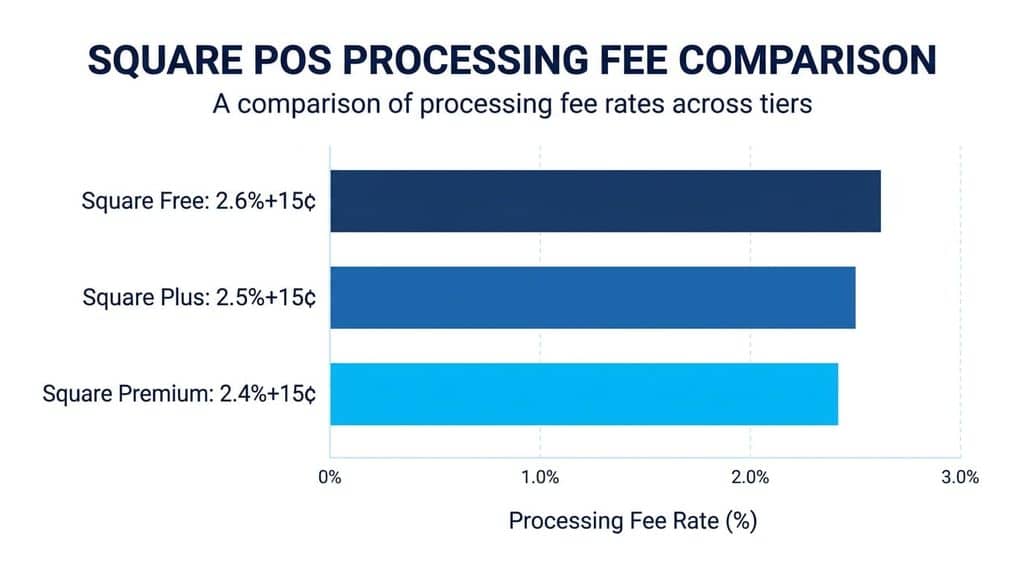
Square’s current pricing: Free plan at 2.6% + 15¢ in-person (3.3% + 30¢ online), Plus at $49/month with 2.5% + 15¢, Premium at $149/month with 2.4% + 15¢, and a custom Pro tier for retailers processing over $250,000 a year. Run your actual annual card volume through those rates before you compare software subscription costs side by side, because for most retailers doing real volume, the processing fee difference dwarfs whatever the monthly software fee is on either side.
If you want a full breakdown, RealtimePOS’s own pricing pagelays out costs by plan and transaction volume.
What to Ask Before You Commit to a New System
Whatever system you’re evaluating, including RealtimePOS, ask the same direct questions: what format do you accept for Square data exports, who on your team helps with the actual migration, and what’s confirmed to transfer versus what you’ll rebuild manually. RealtimePOS has handled data migration for retailers switching from Microsoft RMS, including full inventory, customer, and sales history transfers.
Whatever you choose, it should look like a modern retail POS system, not a patched-together version of what you’re leaving. Whatever system you choose, get that answer in writing before you set a cutover date, not after.
Conclusion
Leaving Square isn’t complicated, but leaving it without checking these five things first is how a switch turns into a mess. Get the data timeline right, plan for gift cards and subscriptions separately, confirm your hardware situation, read the actual contract terms, and run your real numbers before you decide. The retailers who switch smoothly are the ones who asked these questions before they picked a date, not after.
Frequently Asked Questions
How long does it take to export my data from Square?
Do gift card balances transfer when I switch POS systems?
Can I keep using my Square card reader with a new POS system?
Will switching POS systems affect my PCI compliance?
What’s the real cost difference between Square and other POS systems?
Ask Us Directly What Transfers From Square
Get a straight answer on your data, your timeline, and what a switch to RealtimePOS actually looks like, before you commit to a date.
No pressure, no obligation, just a real walkthrough.