

Most “best POS” lists read the same: a table of five vendors, a star rating, a line about pricing. What they skip is the part that actually determines whether a system works for your store, whether it shows you what’s happening on the floor right now or tells you what happened yesterday. That difference, real-time versus end-of-day, is what separates catching a stockout while it’s still fixable from finding out about it from an angry customer.
Key Takeaways
- Real-time reporting, not a features checklist, is what separates a POS that actually helps you run a small retail store from one that just rings up sales.
- A system built to scale means you shouldn’t have to switch platforms when you add a second register or a second location.
- Staff training time is a real cost most “best POS” comparisons ignore entirely.
- If you’re still running an aging IBM or Toshiba terminal, the market has moved past hardware-first systems toward cloud platforms built around live data.
Table of Contents
What Actually Makes a POS “Best” for a Small Retail Store
A retail POS does three jobs: it processes the sale, it tracks what’s left on the shelf, and it tells you what to do next. Most systems handle the first job fine. The second and third are where the real gap between vendors shows up. A system that updates inventory the moment something sells is doing a fundamentally different job than one that reconciles counts overnight, even if both technically call themselves “real-time” in their marketing.
For a small retailer specifically, that gap matters more, not less. A single stockout on a single register is a bigger share of your total sales than it would be for a chain with fifty locations to absorb the miss.
Real-Time Reporting: The Feature Most “Best POS” Lists Skip Over
Search for “best POS systems” and you’ll get a table comparing price, hardware options, and app marketplaces. Almost none of them lead with reporting speed, even though it’s the thing that actually changes how you run the store day to day.
The difference is concrete: an end-of-day report tells you a size sold out sometime yesterday. A real-time report tells you it sold out ten minutes ago, while there’s still time to transfer stock from another location or flag it for reorder before the next customer asks.
Real-time sync is what closes that gap between a sale happening and the system knowing about it. That’s not a nice-to-have dashboard feature, it’s the difference between reacting to a problem and preventing one.
Easy to Learn, Built to Scale
These two ideas usually get treated as a tradeoff, simple systems for small shops, powerful systems for growing ones, as if you have to pick. That framing doesn’t hold up in practice. A system that’s genuinely built well doesn’t get harder to use as it adds capability, it adds a second register, a second location, or an ecommerce channel without changing what a cashier sees at checkout.
Training time is the cost most comparisons leave out entirely. A POS system that’s actually easy to learn means a new seasonal hire is ringing up sales confidently within a shift, not a week. That matters more for a small retailer running lean staff than for a big-box chain with a dedicated training department.
Replacing a Legacy IBM or Toshiba System
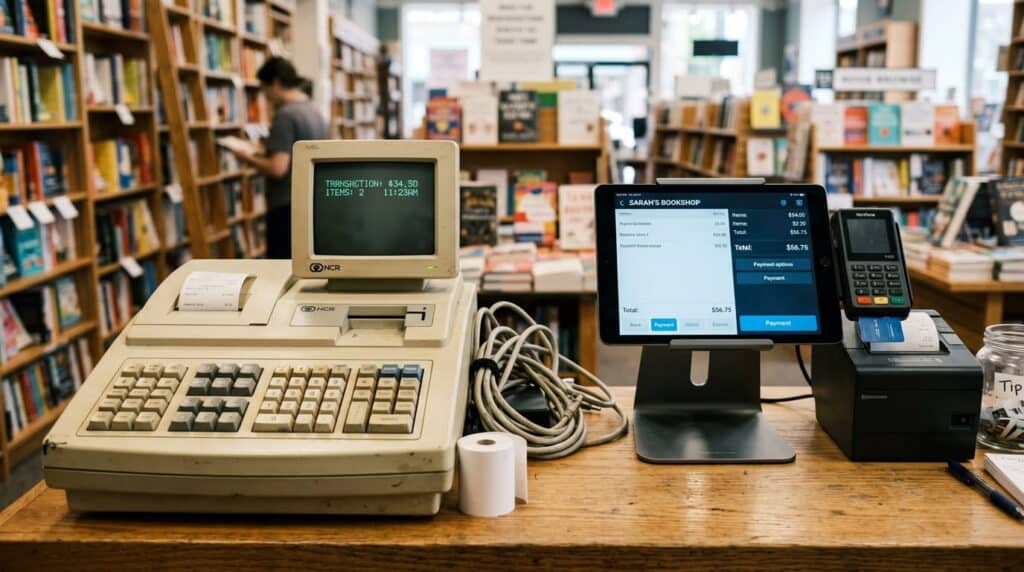
If your current terminal traces back to IBM’s retail hardware, it’s worth knowing that IBM sold its point-of-sale business to Toshiba back in 2012, and the retail technology market has moved substantially since then. That doesn’t mean an old terminal stops working, plenty of them still ring up sales just fine. What it does mean is the system was built for a checkout-first world, not one where a customer expects to see accurate stock online and in-store at the same time.
When retailers do migrate off an IBM or Toshiba-era terminal, it’s almost always for the same reason: the reporting and inventory visibility that legacy hardware was never designed to provide in real time. If checking stock at a different register or location still means walking over and looking, that’s the legacy pattern showing up, regardless of how new the actual terminal is.
How Realtime POS Fits In
Realtime POS is built around the thing its name describes, inventory, pricing, and sales data that update the moment something happens at any register or location, not on a schedule. For a small retailer, that means a stockout gets caught immediately instead of the next time someone happens to check, and a new hire learns one system that doesn’t change shape as the business adds a register or a location. In our work with independent and multi-store retailers over more than 50 years combined, the retailers who feel this hardest are the ones running lean staff on a single register, exactly the profile this page is written for.
That’s a narrower pitch than “does everything,” and it’s meant to be. If real-time visibility across your floor and your online store is the problem you’re actually trying to solve, that’s the specific one this is built for.
See the full Realtime POS platform for the complete feature set beyond reporting.
Want a Detailed Vendor-by-Vendor Comparison?
This page covers what to actually look for in a small retail POS. If you want a named, head-to-head comparison instead, Square, Shopify POS, Clover, and Lightspeed compared directly against Realtime POS breaks down where each one fits and where it doesn’t.
Frequently Asked Questions
What makes a POS system “real-time” versus a regular POS?
Do I need an enterprise POS system if I only have one store right now?
Is it worth replacing an old IBM or Toshiba POS terminal that still works?
How long does it take staff to learn a new POS system?
See What Real-Time Reporting Actually Looks Like
Stop finding out about a stockout after the fact. See how Realtime POS tracks every register and location the moment something sells.






