

You want to sell on Amazon, and you’re worried it’s going to turn into a second inventory system you have to babysit by hand. That worry is well-founded: most POS systems handle in-store sales and maybe one online storefront cleanly, but Amazon runs on its own rules, and pretending it just plugs in like any other channel is how retailers end up overselling in their first month.
This isn’t a connect your account and you’re done guide. It’s an honest look at where your POS’s job ends and something else has to pick up the slack.
Key Takeaways
- Most POS systems can’t talk to Amazon Seller Central natively; a sync layer usually has to sit between them.
- Whether you choose FBA or FBM changes how your inventory sync actually needs to work, it’s not just a fulfillment decision.
- Launch with a limited catalog and a stock buffer for the first few weeks, not your full inventory on day one.
- Amazon’s category approval process can add real time to your launch timeline; plan for it before you promise yourself a go-live date.
In This Guide
- What Your POS Can (and Can’t) Do for Amazon Out of the Box
- FBA vs. FBM: Which One Actually Simplifies Your Inventory Sync
- How to Connect Your POS to Amazon Seller Central, Step by Step
- Avoiding Overselling During Your First Weeks on Amazon
- What to Expect From Amazon’s Category Approval Process
- Amazon’s Marketplace Growth, in Context
- Frequently Asked Questions
What Your POS Can (and Can’t) Do for Amazon Out of the Box
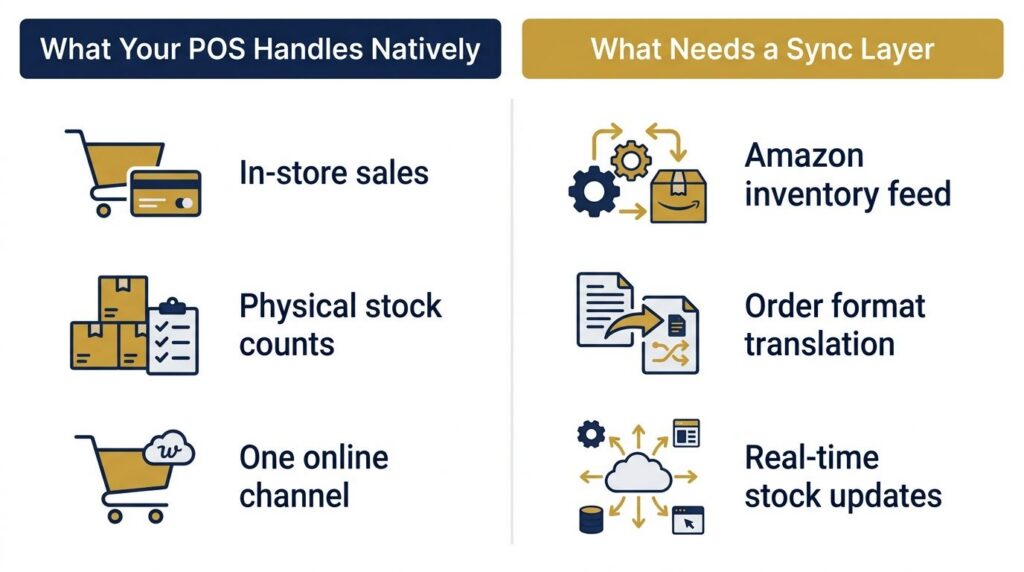
Here’s the part most integration guides skip: your POS was built to manage your register, your stockroom, and maybe a website. It wasn’t built to understand Amazon’s specific inventory feed format, its order structure, or its rules about how fast you have to confirm a shipment.
In our installs, the retailers who get surprised aren’t the ones who lack a good POS, they’re the ones who assumed integration meant flipping one setting. What actually happens: your POS handles what it’s always handled, your physical stock counts and your existing channels, while a separate sync layer translates that data into something Amazon’s system understands and pushes updates back the other way. Skip that layer, and you’re back to manually updating two systems, which is exactly the problem you were trying to avoid.
A point of sale system built with ecommerce integration already accounted for is what makes adding a sync layer for Amazon straightforward instead of a rebuild.
FBA vs. FBM: Which One Actually Simplifies Your Inventory Sync
This decision gets treated as a simple multi-channel fulfillment question. It’s really an inventory sync question, and that’s the part nobody frames correctly.
Under FBA, Fulfilled by Amazon, you ship inventory to Amazon’s warehouses, and Amazon manages stock levels, shipping, and returns from there. Your job shifts to keeping Amazon’s warehouse stocked, not tracking every unit in real time yourself. Under FBM, Fulfilled by Merchant, you keep the inventory in your own store or warehouse and ship orders yourself, which means your sync layer has to be tight, because Amazon is drawing directly from the same stock pool as your other channels.
| FBA | FBM | |
|---|---|---|
| Who manages stock levels | Amazon | You, via your sync layer |
| Sync urgency | Lower, once inventory is shipped to Amazon | High, real-time sync is non-negotiable |
| Best fit | Retailers newer to multi-channel sync | Retailers already running tight real-time sync |
How to Decide Based on Your Current Inventory Setup
If you’re already syncing inventory in real time across in-store and one online channel, FBM keeps that same discipline extended to Amazon, without shipping product away from your own shelves. If your current process still involves manual counts or end-of-day reconciliation, FBA is the safer starting point: Amazon absorbs the sync burden for that channel while you get your core process solid.
How to Connect Your POS to Amazon Seller Central, Step by Step
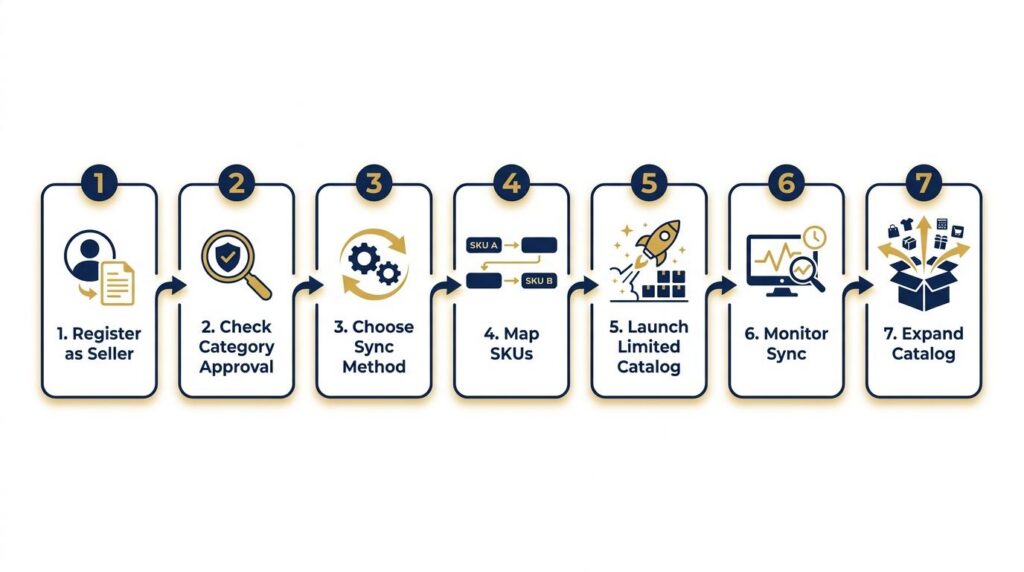
Here’s the order that actually works:
- Register for a Professional Seller account on Amazon Seller Central.
- Check whether your product categories require approval before you can list in them.
- Choose a sync method between your POS and Amazon, either a native integration if your POS supports one, or a middleware connector if it doesn’t.
- Map your SKUs so Amazon’s listings match your existing inventory records exactly, not close enough.
- Launch with a limited catalog and confirm sync accuracy before adding more products.
- Monitor stock updates for the first several days to confirm Amazon reflects sales from your other channels quickly.
- Expand to your full catalog once sync has proven reliable.
If you’re also connecting Shopify alongside Amazon, our guide on Shopify integration walks through that specific connection, worth a look if you’re running both.
Avoiding Overselling During Your First Weeks on Amazon
Amazon customers expect fast, reliable fulfillment, and a cancelled order because of a sync lag does real damage to your seller metrics, not just to one customer’s experience.
In the accounts we’ve worked with, the retailers who avoid overselling on a new channel are the ones who launch small on purpose. Pick 15 to 20 of your best-selling SKUs, hold back a small buffer, maybe 2 to 3 units per item, and watch how quickly your sync reflects a sale made anywhere else before you add your full catalog. If a sale in-store takes hours to show up on Amazon, that’s the gap that causes a cancellation, not bad luck.

Our guide to real-time inventory sync covers this exact failure mode in more depth if you want to see what happens when sync isn’t in place at all.
What to Expect From Amazon’s Category Approval Process
Some product categories on Amazon require approval before you’re allowed to sell in them, often called ungating. This can take anywhere from a same-day approval to a couple of weeks depending on the category and the documentation Amazon asks for.
Plan for this before you commit to a launch date. Nothing derails a planned Amazon launch faster than discovering, the week you meant to go live, that your category needs an approval you haven’t started.
Amazon’s Marketplace Growth, in Context
This isn’t a small platform to bolt onto as an afterthought. Third-party sellers accounted for 61% of paid units sold on Amazon in Q4 2025, according to Amazon’s quarterly investor disclosures, continuing a steady climb from 58% back in 2018. More than six out of every ten items sold on Amazon now come from sellers like you, not Amazon itself.
That’s the context worth keeping in mind when you’re deciding how much sync discipline this channel deserves: it’s not a side experiment, it’s most of the platform’s actual sales volume.

Frequently Asked Questions
How do I connect my POS system to Amazon Seller Central?
Register as a Professional Seller, confirm your product categories don’t need special approval, then connect through a native integration or a middleware sync tool that maps your SKUs between the two systems.
Does Amazon inventory sync automatically with my POS?
Not by default. Most POS systems need a separate sync layer or middleware connection to translate your inventory data into Amazon’s format and keep both systems updated in real time.
What’s the difference between FBA and FBM for inventory sync?
Under FBA, Amazon manages stock levels once you’ve shipped inventory to their warehouses, lowering your sync urgency. Under FBM, you fulfill orders yourself, which means your sync between Amazon and your other channels needs to be accurate in real time.
Can I sell on Amazon without a separate inventory system?
Technically yes, by updating Amazon manually, but that approach breaks down fast once you’re selling the same products across more than one channel. A sync layer between your POS and Amazon is what actually prevents overselling.
Ready to Add Amazon Without Breaking Your Inventory?
See how Realtime POS syncs your inventory in real time across every channel, including Amazon, before you flip the switch on a new one.
Book a Free Demo View Pricing





