
A Labor Day sale that runs smoothly in one channel and falls apart in another costs you more than the discount does. These Labor Day sale ideas for small business retailers are built for exactly that gap, when a physical store plus a website (or multiple locations) means the tactic and the operations behind it have to work together.
Key Takeaways
- Running the same Labor Day promotion in-store and online without a sync check is the fastest way to lose margin, not the discount itself.
- Nine ideas below, ordered from “do this first” to “do this if you have the bandwidth.”
- One three-minute pre-sale checklist that prevents the most common Labor Day weekend mistake.
Table of Contents
- Start With a Sync Check, Not a Sale Idea
- Flash Sales & Limited-Time Offers
- Back-to-School + Labor Day Crossover Bundles
- Social Media Contests & Giveaways
- Email & SMS Retargeting for Abandoned Carts
- Local Business Partnerships & Cross-Promotions
- BOGO & Bundle Pricing That Protects Margin
- Keep In-Store and Online Pricing Identical
- After the Sale: Restock and Reconcile
- Frequently Asked Questions
Start With a Sync Check, Not a Sale Idea
Should you run the same Labor Day sale online and in-store? Yes, but only if your inventory and pricing update between both in real time. If they don’t, a shared promotion turns into two separate sales that happen to have the same name, and the gap between them is where you lose money.
This matters more this year than last. According to CivicScience, only 35% of Labor Day shoppers now plan to shop in-store only, down from 40% last year. More of your customers are moving between your website and your store during the same buying decision, which means a price or stock mismatch between the two is more likely to get caught, and more likely to cost you a sale.
After decades of supporting independent and multi-store retailers through their busiest sale weekends, the pattern holds steady: the promotion itself is rarely what causes problems. What causes problems is a system that hasn’t caught up, an item that sold out online but still shows as available on the shelf, or the reverse, a register sale that hasn’t reached the website yet.
Before you launch anything below, run this check:
- Confirm stock counts match between your POS and your website for every item going on sale.
- Confirm pricing matches across every channel, a shelf tag, a website listing, and a marketplace listing (if you sell on one) should all show the same discounted price.
- Confirm your sync interval. If updates happen every few minutes, you’re fine. If it’s manual or happens once a day, plan your sale around that lag or expect problems.

Retailers using Realtime POS’s ecommerce integration don’t have to think about this step, inventory and pricing update across channels automatically if you’re running this manually, budget real time for it, not an afterthought the morning of the sale.
Flash Sales & Limited-Time Offers
Scarcity works. “24 hours only” or “only 12 left” gives a browsing customer a reason to buy now instead of later. But it only works if it’s true.
If your “24-hour flash sale” quietly stays live for four days because nobody remembered to take the banner down, you’ve traded a short-term sales bump for a long-term trust problem. Customers who catch a fake deadline stop believing your next one.
Set an Honest Countdown
Pick a start and end time you can actually enforce, and check that your website, email, and in-store signage all agree on it. A flash sale that ends at 9 pm online but the store closes at 6 pm creates confusion nobody planned for. Keep it simple: pick one end time, apply it everywhere.
Back-to-School + Labor Day Crossover Bundles
Labor Day sits at an odd seasonal intersection, summer is ending, school just started or is about to, and fall inventory is arriving. Use that overlap instead of ignoring it.
This isn’t a small window. K-12 back-to-school spending is forecast to hit a record $43.3 billion this year, according to the National Retail Federation. Families are actively shopping this category right through Labor Day weekend.
A bundle that pairs a summer clearance item with a back-to-school essential (think: last season’s backpacks bundled with new school supplies, or end-of-summer apparel paired with fall basics) moves two categories of inventory at once instead of one.

This works especially well if you’re sitting on aging summer stock you’d otherwise mark down individually. Bundling protects your average sale price better than a blanket discount does, more on that in the pricing section below.
Social Media Contests & Giveaways
A Labor Day giveaway has one advantage over a flash sale: it can run before and after the actual holiday weekend, stretching your promotional window without extending your discount window.
Keep the entry mechanic simple, follow, tag a friend, or share a post, and run it on whichever platform your customers already use, Instagram and Facebook remain the most straightforward for a small retailer to manage without extra tools. Check current platform rules on contest mechanics before launching, requirements around disclosures and eligibility change periodically.
Email & SMS Retargeting for Abandoned Carts
If someone added an item to their cart and left without buying, Labor Day weekend is a good excuse to bring them back. An automated reminder, sent a few hours after they abandon the cart, recovers sales you’d otherwise lose entirely.
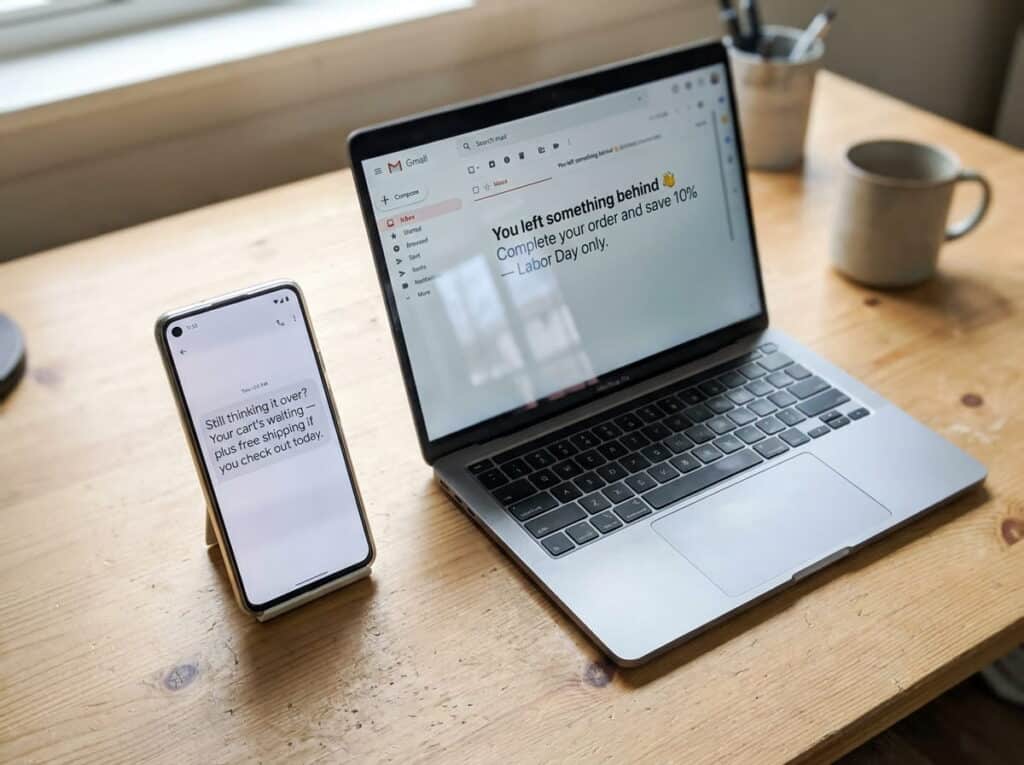
Sweeten it slightly: a small discount or free shipping on the reminder message converts better than a plain “you left something behind” note. This only works, again, if the item is actually still in stock when they come back, which ties directly back to the inventory accuracy problem that shows up any time a retailer runs sales across more than one channel without real-time syncing.
Local Business Partnerships & Cross-Promotions
If you’re a single-location independent retailer, this is one of the highest-leverage, lowest-cost ideas on this list. Partner with two or three neighboring businesses and create a shared “savings passport”: a customer who shops all participating stores over the weekend gets an extra discount or a small perk.
It costs nothing to set up beyond coordination, and it brings in foot traffic that was headed to a neighbor’s store anyway. This tactic doesn’t scale as cleanly for multi-location retailers managing partnerships across different markets, but for a single storefront it’s worth the effort.
BOGO & Bundle Pricing That Protects Margin
A flat 30% off everything feels generous to the customer and expensive to you. BOGO and bundle pricing often deliver the same perceived value with a smaller hit to your actual margin, because you’re moving two units at a controlled combined price instead of discounting every single item uniformly.
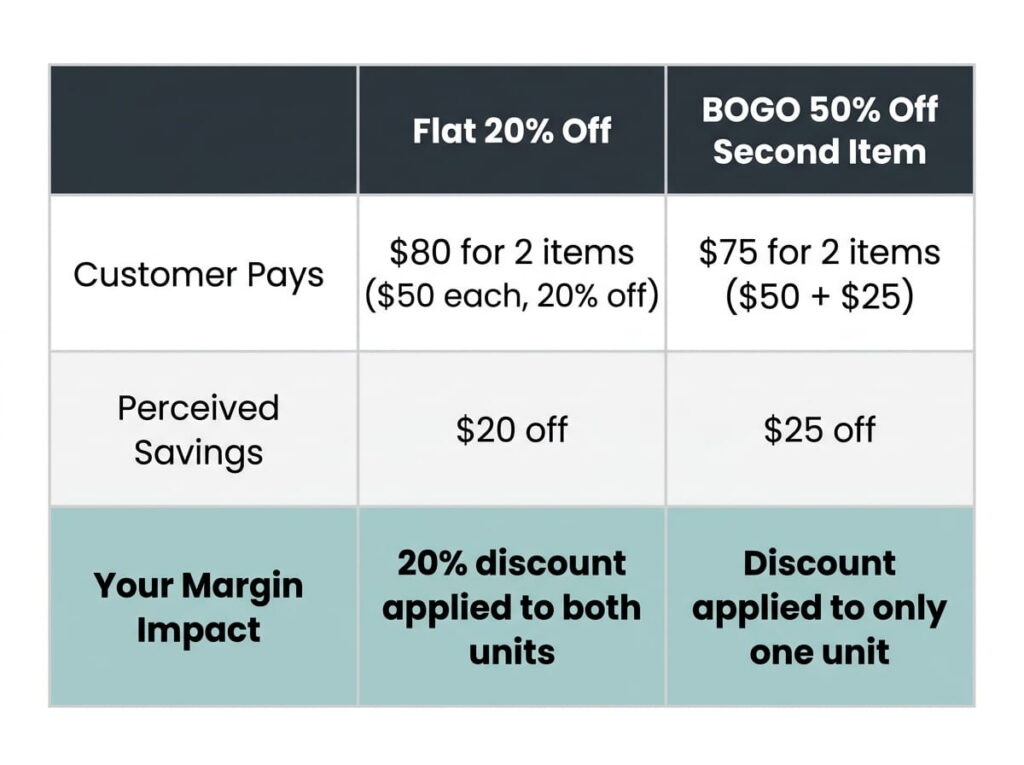
Rule of thumb: if a flat discount is cutting into a category you can’t afford to mark down further, a “buy one, get the second at 50% off” structure usually protects margin better than “20% off everything,” because the discount only applies once the customer has already committed to buying two.
Keep In-Store and Online Pricing Identical
This is worth its own section because it’s the single most common way a multi-channel Labor Day promotion goes wrong. A customer sees a price online, drives to your store expecting to pay it, and finds a different number on the shelf tag. Best case, you honor the online price and eat the difference. Worst case, you lose the sale and the customer’s trust in one visit.
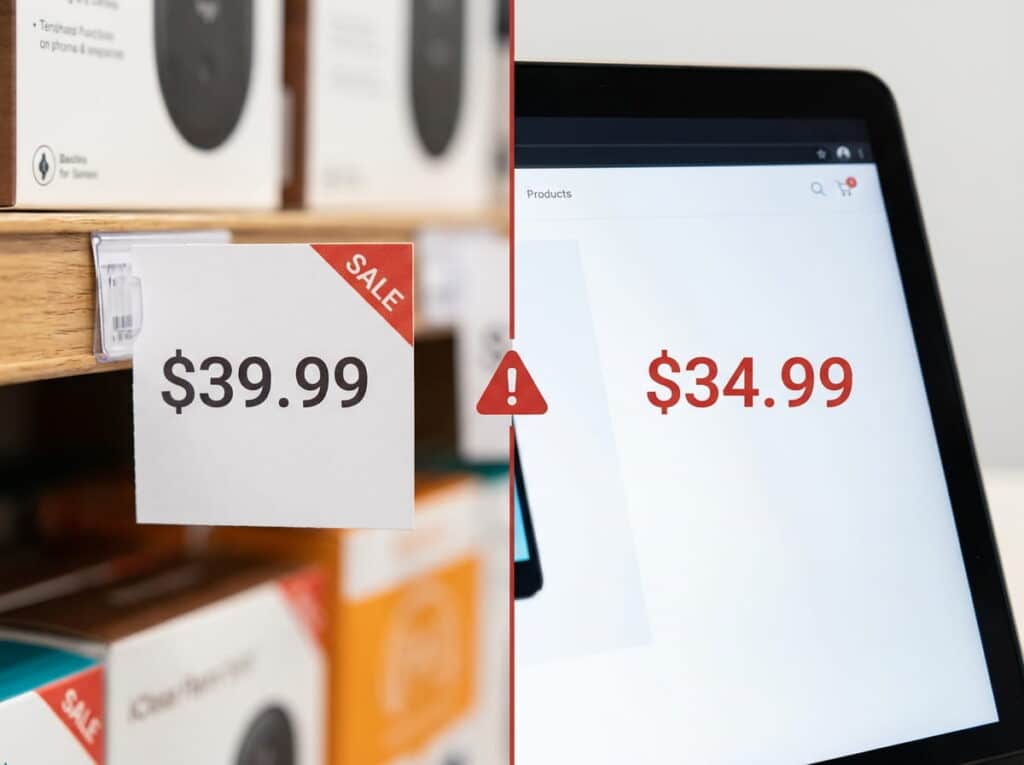
The fix isn’t complicated in theory: whatever pricing change you make for the sale needs to apply everywhere, at the same time, automatically. Retailers running platforms like Shopify alongside their POS need that price update to push both directions without someone manually re-entering numbers in two systems during the busiest weekend of the quarter.
After the Sale: Restock and Reconcile
The sale ending isn’t the finish line. Within 24 hours, reconcile your actual on-shelf inventory against what your system says you have. Sale weekends are exactly when small discrepancies (a miscounted return, a damaged item pulled from the floor) accumulate, and if they carry unnoticed into your fall ordering, you’ll either over-order or run out of something you didn’t realize was low.
This reconciliation step takes far less time than untangling a stock discrepancy three weeks later when you’re trying to figure out why your numbers don’t match. A 20-minute count on Tuesday morning is a routine task. The same discrepancy discovered mid-way through your fall reorder means guessing at what you actually have on hand while a supplier deadline is closing in.
Frequently Asked Questions
What is the best Labor Day sale strategy for a small retail store?
How do I avoid overselling inventory during a Labor Day sale?
What discount percentage works best for Labor Day promotions?
Should I run the same Labor Day sale online and in-store?
Don’t Let Sync Issues Undercut Your Labor Day Sale
See how Realtime POS keeps inventory and pricing identical across every channel, automatically, so your busiest sale weekend doesn’t turn into your busiest support-call weekend.
No pressure, no obligation, just a real look at how it works before your next big sale.